
King Content
The thing that hath been, it is that which shall be; and that which is done is that which shall be done: and there is no new thing under the sun. – Ecclesiastes 1: 9
It’s all been done before – Barenaked Ladies
In the time since Al Gore invented the internet the deluge of content on it has become overwhelming. Millions of articles, covering just about every topic possible, are written and posted every day.
Our biggest challenge as SEO’s is finding a way to break through the slush clogging up the pipelines of cyberspace. It is a daunting task. Especially if BNL is right and everything has been done. The problem gets larger when you are writing for long term clients, then you aren’t just repeating what others have said you are often repeating yourself.
I wrote four articles about dentistry this month. Next month I will write four more. It is getting difficult to come up with anything original. I’ve spent so much time doing research that I am afraid I might suddenly raise up on my desk, take my shirt off , twist it round my head, and spin it like a helicopter all while screaming dental terms like expletives.

BICUSPID!!!
How do we say something that has already been said, by ourselves or by others, without losing our minds and without boring our audiences?
Lets look to a case study for help on the matter
King Kong
The original King Kong came out in 1933. Since then the movie has been remade several times.
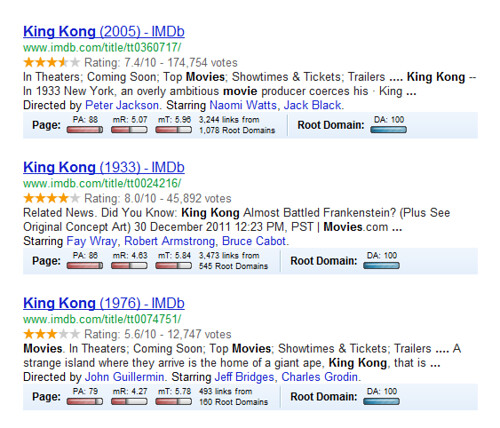
What…? My Mozbar is showing …? How embarrassing.
Each version follows the exact same story line; Kong lives happily on a previously undiscovered island, he meets an alluring girl, he is captured and brought to the city, he gets loose and uses the Manhattan skyline as his jungle gym.
Even though the story has been repeated, the latest version was very successful. Peter Jackson’s 2005 film has an 81 rating on Metacritic and 84 on Rotten Tomatoes.
What was it about his approach that turned an old story into a fresh and exciting one?
Successful Recycling
Everything has been said before, but since nobody listens we have to keep going back and beginning all over again. – Andre Gide
There is nothing new under the sun but there are lots of old things we don’t know. – Ambrose Bierce
The great thing about human beings is that we forget stuff. I imagine the world would get boring really fast if we didn’t.
The first two Kong films were separate by 43 years, the third came 29 years later. They were sufficiently spaced so that the viewing public did not get burnt out on the subject.
Luckily for us, the attention span of the internet is shorter than a 5-year-old’s in Disneyland. We don’t need to wait for years to recycle a story. If your article is older than 6 months, unless it went viral, chances are no one remembers it but you.
When a well researched article isn’t shared it is not because the ideas are bad, it is because they aren’t packaged in an interesting way. Your content can do a lot more work for you if you simply repackage and repost.
Let us look at some specific ways that the King Kong story has been repackaged.
Popularity
In 2005 Peter Jackson was fresh off the success of the Lord of the Rings thrillogy. He was the hottest name in Hollywood. If people didn’t care about the giant monkey, they went to see the movie because Peter Jackson’s name was attached to it. Universal capitalized on his popularity to resell an old story.
How can this work for us?
If you are following our twitter account @utseo, you might have seen this article, entitled Angelina’s Leg and User Friendly Web Design. If you don’t know what this article is referring to you either live in a hole in Canada or you tried really hard to avoid any news about the recent Oscars.
This article would probably not have grabbed my attention without its intriguing and timely title. If we use trending topics to help promote our tweets we need to do the same with our articles. An old article suddenly becomes fresh when it is tied to a timely topic.
Update
The movie industry is constantly being forced to adapt to new technologies. After the first movies with convincing CGI were released, movie goers were no longer appeased by old graphics. This simple change opened the door for all of the movie remakes we have seen in the last few years. Hollywood hasn’t run out of ideas they are just taking the easiest and most lucrative option to them. Why write a new story when you can take an old one, spend a little money on special effects, and re-release it to make millions?
Even though the 1933 film was still a good movie, watching it now, the special effects are laughable. Even the 70’s version was a little hokey. The 2005 release gave the story a facelift and made it more palatable to a modern audience.
How can this work for us?
Technology is always changing and not just for the movie industry. Keeping up with the newest ideas in your clients’ field is important if you are going to stay relevant. But if you have already written an article on the newest updates you can easily repurpose old content for a compare and contrast. Some industries, like SEO, are changing so fast that this technique could be a gold mine for new content.
Branch Out
So far we have only talked about the three movies that carry the title of King Kong. But there are numerous derivations. Mighty Joe Young is almost exactly the same story and there were two versions of this film in 1949 and 1998. Notice that both of these movies were made to fill the giant ape gaps left by the Kong movies.
I won’t even talk about the TV shows and other related films that have split off of the original idea. The world must not be getting its fill of the big monkey.
How can this work for us?
The old adage, “if it ain’t broke, don’t fix it,” doesn’t just apply to your lawn mower and the 70’s Schwinn sitting in your garage. No matter how many “how to” or “top 10” articles are written on a subject these headlines will always get some attention.
Your best source for new ideas is to look through old content. Often you will find some little section that you can expand into a full article. Or you could take the entire article and fit it into a new format like the two already mentioned. Don’t waste your most precious resource, yourself.
Find a New Voice

These Geico ads are a great example of a new voice for old ideas. Just look at their campaign, the three little pigs, woodchucks chucking wood, Foghorn Leghorn, Elmer Fudd; all of these stories have been around for a while. All these advertisers did was add a new and interesting voice.
This is the same thing Universal did when they brought on Peter Jackson. His voice telling an old story made it new and interesting.
How can this work for us?
That article which has been sitting unshared and lonely in the black expanse of cyberspace only needs a new voice to brighten it up and bring it some friends. If you have a lot of old content lying around that is all written in a dry, informative, or academic style try adding a new tone. Make it playful or sarcastic, anything that is different and interesting. Revising the tone of an article is so much easier than writing a new one.
The End
With everything we have on our SEO plate we can’t afford to waste any resources. Take a lesson from King Kong, let your content do work for you. Don’t waste time doing new research and coming up with new ideas when you don’t have to. Use these simple rules of recycling to save yourself time and money.